How to Find 0% Ethanol (E0) Petrol Stations in India: Complete Step-by-Step Locator Guide
Step-by-step guide to finding authentic 0% ethanol (E0) petrol stations near you anywhere in India. Learn how to use the E0 Finder app, filter by oil company, inspect Form-8 logs, and report new stations.
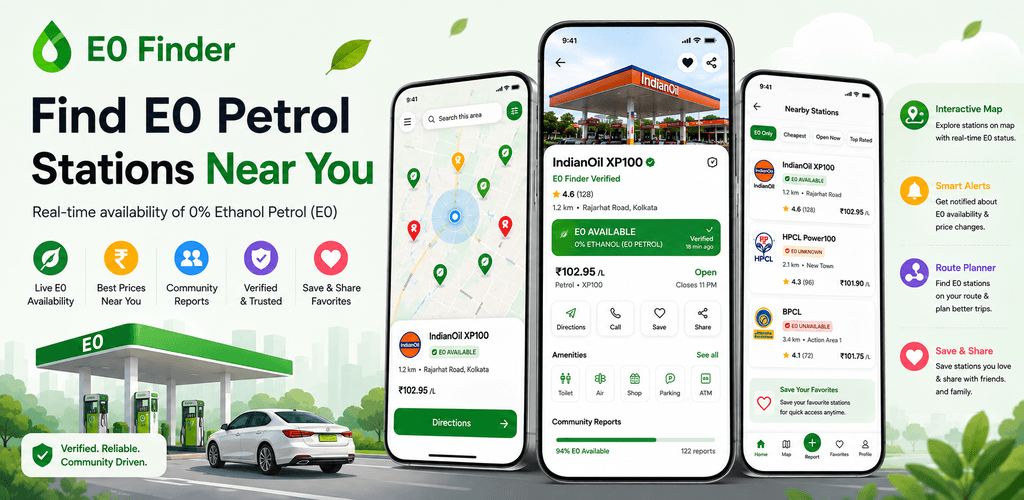
Key Takeaways for Indian Motorists:
- Standard map apps (Google Maps, Apple Maps) do not track ethanol blending percentages or fuel quality standards.
- E0 Finder is India's first and only dedicated crowd-verified platform mapping authentic 0% ethanol petrol stations in real-time.
- Filter stations by grade (XP100, poWer100, Speed 97) and oil company (IndianOil, HPCL, BPCL, Shell).
- Community motorists can upload fuel bills and Form-8 density photos to verify new pumps in their local area.
Table of Contents
Why Generic Mapping Apps Fail Motorists
If you open Google Maps and search for "petrol pump near me", you will find hundreds of red pins. But none of these platforms can tell you:
- Does this petrol bunk sell 0% Ethanol Petrol or standard 20% Ethanol (E20)?
- Does this outlet have dedicated XP100 or poWer100 dispensers in stock today?
- When was the last time a real motorist verified the morning fuel density?
E0 Finder was created to bridge this national information gap as an independent, crowd-verified platform built specifically for Indian motorists and automotive enthusiasts.
Step-by-Step: How to Locate Pure E0 Petrol in Your City
Step 1: Download and Open E0 Finder
Download the official E0 Finder Android app from the Google Play Store (Package: com.anupampradhan.ethanolfreepetrol). The app is 100% free with no login walls.
Step 2: Grant GPS Location Permission
Upon opening, the app automatically locates your vehicle and displays a high-contrast map with verified green station markers in your immediate vicinity.
Step 3: Filter by Fuel Grade and Brand
Tap the Filter icon to customize your search:
- IndianOil XP100: 100-octane, 0% ethanol pure hydrocarbon fuel.
- HPCL poWer100: Ultra-premium 100-octane unblended petrol.
- Company-Owned (COCO) Outlets: Filter for verified flagship company-operated pumps for guaranteed quantity and quality.
Step 4: Inspect Live Community Verification Data
Tap on any station marker to view:
- Station Name & Exact Address: With landmark details.
- Last Verification Timestamp: See when another driver last fueled there.
- Observed Fuel Density: Real Form-8 density numbers (720–775 kg/m³).
- Driver Reviews & Photos: View photos of the fuel dispenser and receipts.
Step 5: Start Turn-by-Turn Navigation
Tap the "Navigate" button to instantly launch Google Maps or Apple Maps with direct coordinates to the fuel pump forecourt.
How to Contribute and Report New E0 Pumps
Our community of over 10,000 active Indian riders and drivers keeps the map fresh every day:
- Whenever you spot a station dispensing XP100 or verified unblended fuel, tap "Add Station / Report" in the app.
- Enter the pump location and observed density from the dispenser.
- Snap a quick photo of your fuel bill.
- Our moderation system validates the report, and the station goes live for all nearby motorists within minutes!
Download E0 Finder today and join India's fastest-growing driver community!
Calculate Your Fuel & Maintenance Savings
See how much fuel and preventive repair costs your bike or car saves on pure E0 petrol.
Visual Evidence & E0 Finder In-App Verification



Find 0% Ethanol Petrol Near You Instantly
Download E0 Finder for Android. Real-time verified pumps, live density logs (Form-8), turn-by-turn navigation, and crowd-verified reports across 500+ Indian cities.